Source

Wednesday, 10 October 2012

Namma Bagalkot: Everything about Bagalkot
HERE is a guy named Amrut Deshpande who is running a informative site about Bagalkot. It give information about everything; from movies to masala chat, from education to tourism, hotels, hospital, industries etc.
Good site to check out latest news about Bagalkot.
Namma Bagalkot
About Bagalkot
Good site to check out latest news about Bagalkot.
Namma Bagalkot
About Bagalkot
Google’s Takeout
Google introduces “Google Takeout” with which you can take out all your information at the google account to your personal computer.
Many people were facing problems with downloading their own videos on Youtube though it had a way to do that which was tedious,But now with the new “Google takeout” you can do that easily with just a click of button.
Google introduces “Google Takeout” with which you can take out all your information at the google account to your personal computer.
Many people were facing problems with downloading their own videos on Youtube though it had a way to do that which was tedious,But now with the new “Google takeout” you can do that easily with just a click of button.

What more you can takeout?
This tool transfers your Google+ circles and other connections from a “source” account to a “destination” account. It also replaces your source profile with your destination profile in other people’s circles. The source and destination accounts must have the same name.
You can selsect all data or you can select one or more services, your data will be archived within few minutes and mailed to you then you can download that.
What more you can takeout?
This tool transfers your Google+ circles and other connections from a “source” account to a “destination” account. It also replaces your source profile with your destination profile in other people’s circles. The source and destination accounts must have the same name.
You can selsect all data or you can select one or more services, your data will be archived within few minutes and mailed to you then you can download that.
Many people were facing problems with downloading their own videos on Youtube though it had a way to do that which was tedious,But now with the new “Google takeout” you can do that easily with just a click of button.
Google introduces “Google Takeout” with which you can take out all your information at the google account to your personal computer.
Many people were facing problems with downloading their own videos on Youtube though it had a way to do that which was tedious,But now with the new “Google takeout” you can do that easily with just a click of button.

What more you can takeout?
- Google’s +1’S
- Youtube Videos
- Google Drive data
- Google Buzz’s
- Google Contacts
- Docs
- Picasa Web Albums
- Google+ data(circles,streams,profile)
This tool transfers your Google+ circles and other connections from a “source” account to a “destination” account. It also replaces your source profile with your destination profile in other people’s circles. The source and destination accounts must have the same name.
- The transfer begins 7 days after you request it. To cancel the transfer before it starts, sign in to either account on Google+ and click Cancel Transfer at the bottom of the page.
- You cannot cancel a transfer from the mobile app.
- Once the transfer begins, you’ll have limited access to Google+ on both accounts. Transfers typically take about 48 hours. After the transfer begins, you can’t stop or undo it. You can transfer your connections to or from a Google Account only once every 6 months.
You can selsect all data or you can select one or more services, your data will be archived within few minutes and mailed to you then you can download that.
What more you can takeout?
- Google’s +1’S
- Youtube Videos
- Google Drive data
- Google Buzz’s
- Google Contacts
- Docs
- Picasa Web Albums
- Google+ data(circles,streams,profile)
This tool transfers your Google+ circles and other connections from a “source” account to a “destination” account. It also replaces your source profile with your destination profile in other people’s circles. The source and destination accounts must have the same name.
- The transfer begins 7 days after you request it. To cancel the transfer before it starts, sign in to either account on Google+ and click Cancel Transfer at the bottom of the page.
- You cannot cancel a transfer from the mobile app.
- Once the transfer begins, you’ll have limited access to Google+ on both accounts. Transfers typically take about 48 hours. After the transfer begins, you can’t stop or undo it. You can transfer your connections to or from a Google Account only once every 6 months.
You can selsect all data or you can select one or more services, your data will be archived within few minutes and mailed to you then you can download that.
Saturday, 6 October 2012
India needs more than 4 lakh Hackers

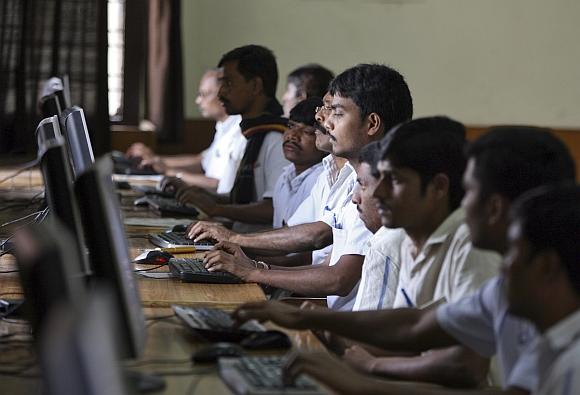

According to CERT-In, the national
incident response centre, a government nodal agency, at least 42 million
Indians were hit by cyber crimes and the recorded loss of the same was a
staggering $8 billion loss in disaster in the past 12 months.
Mohan Gandhi, an Indian Institute of Management Ahmedabad graduate provides anti-piracy solutions through his company Entersoft Information Systems. In this interview with rediff.com's Vicky Nanjappa, Gandhi speaks about the challenges while dealing with cyber security and also what it is to be an ethical hacker.
How important is it for India to have ethical hackers?
Forty two million Indians were hit by cyber crimes in the last 12 months, with a total of $8 billion recorded in direct financial losses to the corporate world. India is the third-most affected nation due to hackers.
In terms of cyber attacking abilities and fortification standards of India is far below Israel, the United States and China. China filters and monitors almost every packet/piece of information.
Unfortunately, India has seen many government, and defense websites being hacked in the recent times. Our country has been traditionally defensive in terms of information security.
Have we identified the importance of ethical hackers?
Corporate India has now identified the importance of ethical hackers and almost every security company has them as a strategy to perform ethical covet activities. According to latest estimation by Cert-In, India is in need of more than 4 lakh ethical hackers.
The world has seen how important intellectual property in this century is. Firms such as Apple, Samsung and Microsoft of the world use patenting for competitive edge.
source
Mohan Gandhi, an Indian Institute of Management Ahmedabad graduate provides anti-piracy solutions through his company Entersoft Information Systems. In this interview with rediff.com's Vicky Nanjappa, Gandhi speaks about the challenges while dealing with cyber security and also what it is to be an ethical hacker.
How important is it for India to have ethical hackers?
Forty two million Indians were hit by cyber crimes in the last 12 months, with a total of $8 billion recorded in direct financial losses to the corporate world. India is the third-most affected nation due to hackers.
In terms of cyber attacking abilities and fortification standards of India is far below Israel, the United States and China. China filters and monitors almost every packet/piece of information.
Unfortunately, India has seen many government, and defense websites being hacked in the recent times. Our country has been traditionally defensive in terms of information security.
Have we identified the importance of ethical hackers?
Corporate India has now identified the importance of ethical hackers and almost every security company has them as a strategy to perform ethical covet activities. According to latest estimation by Cert-In, India is in need of more than 4 lakh ethical hackers.
The world has seen how important intellectual property in this century is. Firms such as Apple, Samsung and Microsoft of the world use patenting for competitive edge.
source
Friday, 13 July 2012
Free.. Frrreeee
Office Suite
- OpenOffice.org – OpenOffice.org is a viable alternative to Microsoft Office – even for professional use. It can do just about anything Office can.
- AbiWord – A lightweight version of Microsoft Office. Simple, straightforward interface; easy to use.
- Jarte – A word processor based on the Microsoft WordPad. It can be run directly from a USB flash drive.
- Notepad++ – A free source code editor and Notepad replacement, which supports several programming languages, running under the MS Windows environment.
- EditPad Lite – A general-purpose text editor, designed to be small and compact, yet offer all the functionality you expect from a basic text editor.
Security
6. · avast! 4 Home Edition
– A complete antivirus solution that is able to find computer viruses,
create and check the integrity of programs installed, test executed
programs and opened documents, to test and check email and other
functions.
7. · AVG Anti-Virus
– A free security solution that is easy to use, has low system
resources, automatic update functionality and ability to protect as
files are opened and programs are run.
8. · Comodo Firewall
– A free firewall that constantly monitors and defends your PC from
internet attacks. It is a fully functional product that comes with
continual updates that are free forever!
9. · McAfee SiteAdvisor – A plugin for Firefox and IE browser that shows safety rating as you browse the Web.
10. · SpyCatcher Express
– A free anti-spyware program that allows novice PC users to remove
aggressive spyware, stops next-generation, mutating spyware, blocks
reinstallation of aggressive spyware and removes spyware safely and
automatically.
11. · StartupMonitor
– A small monitoring program that keeps a constant eye on your system’s
startup entries. When ever a change is made, you will be notified and
given a choice to either allow the change or not to change.
12. · SuperStorm Freeware
– This software allows you to hide your confidential files and folders
in a wide variety of media files such as pictures, audio, video,
executable programs among many other file types.
13. · Windows Defender
– A free program that helps protect your computer against pop-ups, slow
performance, and security threats caused by spyware and other unwanted
software.
14. · HijackThis
– A malware remove tool that makes a detailed log of what’s going on in
your Registry and gives you the opportunity to remove things that might
be suspect.
15. · Zone Alarm
– This software lets you block uninitiated and unwanted traffic, even
while your PC is unattended or while you’re not using your connection.
Desktop management
16. · Google desktop – A desktop search application that gives you easy access to information on your computer and from the web.
17. · Yahoo Desktop
– Yahoo Desktop enables you to search and instantly find information,
preview it in its native format, and take action on it immediately.
18. · TweakUI
– This software reduces the Windows annoyance without having to meddle
with the registry. It gives you access to system settings that are not
exposed in the Windows XP default user interface, including mouse
settings, Explorer settings, taskbar settings, and more.
19. · Pretty run – A small program that can search your start menu, desktop or any other folder for shortcuts.
20. · RoboForm
– RoboForm memorizes and securely stores each user name and password
the first time you log into a site, then automatically supplies them
when you return.
21. · AutoHotkey -
This open-source utility can automate almost anything by sending
keystrokes and mouse clicks. You can write macros by hand or use the
macro recorder. You can also create hotkeys for keyboard, mouse,
joystick, and handheld remote controls.
22. · Keepass safe
– A password manager which helps you to manage your passwords in a
secure way. You can put all your passwords in one database, which is
locked with one master key or a key-disk.
23. · Clipomatic
– A clipboard cache program that remembers what was copied to the
clipboard and allows you to retrieve it, even after you’ve copied
something else to the clipboard.
Browser
24. · Firefox
– Firefox includes tons of useful features such as tabbed browsing,
built-in and customizable search bars, a built-in RSS reader and a huge
library of extensions developed by thousand of developers.
25. · Opera
– Opera introduces Speed Dial which vastly improves navigation to your
favorite sites. In addition, there’s Fraud protection, an anti-phishing
detection keeps browsing safe and secure.
26. · Crazy browser
– A browser that allows users to collect tabs into groups and then load
an entire group at once. This feature is very useful for research, as
you can summon a set of related sites as needed, without manually
opening each one.
Fun and Games
27. · Banshee Screamer Alarm
– A snoozeable alarm clock designed to wake you up. Play MP3s, execute
programs, or shut down your computer at the time you set.
28. · BZFlag
– An online multiplayer cross-platform open source 3D tank battle game.
It runs on Irix, Linux, BSD, Windows, Mac OS X, and many other
platforms. It’s one of the most popular games ever on Silicon Graphics
machines.
29. · ConWare IconArt
– An easy-to-use icon & cursor editor that allows your to design
your own, edit previous icons, create cursors, capture icons from
programs and DLL files or import an image for your icon.
30. · Google Earth
– Google Earth combines the power of Google Search with satellite
imagery, maps, terrain and 3D buildings to put the world’s geographic
information at your fingertips.
31. · Tux Racer
– Getting bored and sick of the Windows game? Tux Racer lets you take
on the role of Tux the Linux Penguin as he races down steep,
snow-covered mountains. Enter cups and compete to win the title!
32. · ZSNES
– A Nintendo emulator on your desktop. ZSNES is built to run on
Windows, DOS, Linux and FreeBSD Unix and it is by far the best SNES
emulator available.
33. · Cartes du Ciel – A sky map that allows you to find out what constellations and planets are visible tonight.
Graphics Editing
34. · GIMP
– A complete image editing software with capabilities not found in any
other free software product. It can be used as a simple paint program,
an expert-quality photo-retouching program, a mass production image
renderer, or an image-format converter.
35. · Paint.net
– A free image and photo editing software that features an intuitive
and innovative user interface with support for layers, unlimited undo,
special effects, and a wide variety of useful and powerful tools.
36. · Google sketchup
– A powerful yet easy-to-learn 3D software tool that combines a simple,
yet robust tool-set with an intelligent drawing system that streamlines
and simplifies 3D design.
37. · IrfanView – A fast and compact image viewer/converter that is simple for beginners and powerful for professionals.
Video and Audio
38. · Audacity
– A complete recording and sound editing software that is available for
Mac OS X, Microsoft Windows, GNU/Linux, and other operating systems.
39. · Media Monkey
– A music manager and jukebox for serious music collectors and iPod
users. It offers an intelligent tag editor which looks up missing Album
Art and track information via Freedb and the Web.
40. · CDex – An application that records audio tracks from CDs and saves them to a disk as regular WAV files or as encoded sound files.
41. · iTunes
– One of the highest downloaded digital-jukebox software. Comes with
the iTunes Music Store that offers music at 99-cents-per-song.
42. · Winamp
– A multimedia player that supports numerous audio and video formats.
It also plays streamed video and audio content, both live and recorded,
authored worldwide.
43. · VLC
– A highly portable multimedia player for various audio and video
formats (MPEG-1, MPEG-2, MPEG-4, DivX, mp3, ogg, …) as well as DVDs,
VCDs, and various streaming protocols.
44. · QuickTime Alternative – This application let you play QuickTime or Real videos without Apple or Real’s bloated, in-your-face proprietary players.
PDF creator
45. · PrimoPDF
– A free tool for high-quality PDF creation, comprising a user-friendly
interface that enables printing to PDF from virtually any Windows
application.
46. · PDF creator
– A simple PDF creation tool for those who just want to skip the
technical steps and produce a PDF file. If you know how to print, then
you know how to use this software.
47. · doPDF
– Using doPDF, you can create searchable PDF files from virtually any
application. You can search for text within the created PDF file, and
search engines will also index the text from the PDF.
Virtual Server
48. · VMware Server
– VMware Server installs on any existing server hardware and partitions
a physical server into multiple virtual machines by abstracting
processor, memory, storage and networking resources, giving you greater
hardware utilization and flexibility.
49. · LogMeIn Hamachi – A VPN that allows you to access your home PC from work (or vice versa) as though you’re sitting right in front of it.
50. · OpenVPN
– OpenVPN is a tried and true VPN solution. It is totally secure and
infinitely configurable. You can install and run this software without
relying on a third party.
Instant Messaging
51. · Windows Live messenger
– The next generation MSN Messenger. It comes with everything that were
already available in Messenger, and a new i’m Initiative that makes
helping your favorite charity as easy as sending an instant message.
52. · Pidgin
– A multi-protocol Instant Messaging client that allows you to use all
of your IM accounts at once. Pidgin can work with: AIM, Bonjour,
Gadu-Gadu, Google Talk, ICQ, IRC, MSN, Yahoo!, MySpaceIM and many more.
53. · Trillian – A fully featured, stand-alone, skinnable chat client that supports AIM, ICQ, MSN, Yahoo Messenger, and IRC.
54. · Skype – A software that enables you to make free calls anywhere in the world.
Download manager
55. · Download Accelerator Plus
– A download manager that can enhance your download experience.
Features include a search tab, security check for every site and
application you download, more speed per connection, resume broken
download and preview file when you download.
56. · Internet download manager
– A tool for increasing download speeds by up to 5 times, and for
resuming, scheduling, and organizing downloads. The program will resume
unfinished downloads due to network problems, or unexpected power
outages.
57. · Getright
– As a download manager, GetRight supports BitTorrent downloads too. In
addition, you can use GetRight to schedule your downloads for later; it
can dial your modem (if needed), download the files you want, then hang
up or even shut down your computer when it is done.
58. · DownThemAll – A powerful yet easy-to-use Mozilla Firefox extension that adds new advanced download capabilities to your browser.
59. · Flashgot
– A Firefox extension that allows you to handle single and massive
downloads using the external download managers of your choice.
File Management
60. · Eraser
– An advanced security tool for Windows that allows you to completely
remove sensitive data from your hard drive by overwriting it several
times with carefully selected patterns.
61. · Restoration
– An easy to use and straight forward tool to undelete files that were
removed from the recycle bin or directly deleted from within Windows (we
were able to recover photos from a Flash card that had been formatted).
Torrent Manager
62. · Azureus – A popular torrent manager that allows you to install plug-in and tweak your own settings.
63. · µTorrent
– A very, very tiny BitTorrent client that packs enough features into
that small package to compete with beefier applications like Azureus.
64. · Bitcomet
– A bit torrent manager that allows videos files to be previewed while
they’re still being downloaded, and there’s a built-in chat tool that
lets users chat with other peers in the swarm.
Backup Program
65. · Cobian Backup
– A multi-threaded program that can be used to schedule and backup your
files and directories from their original location to other
directories/drives in the same computer or other computer in your
network.
66. · Back4Win – A backup program that uses industry standard ZIP compression
to ensures that your data will be accessible regardless of which PC
operating system. Does not have 4Gb and 65535 file limit of other ZIP
backup programs.
67. · DriveImage XML
– This software allows you to backup logical drives and partitions to
image files, browse these images, view and extract files, restore these
images to the same or a different drive and copy directly from drive to
drive.
68. · JaBackup
– JaBackup allows advanced automation features. You can schedule backup
tasks by the second or minute, or on a hourly, daily, weekly, or
monthly basis.
69. · Xdrive Desktop
– Xdrive gives you 5GB of online storage space to store and backup your
files. The Xdrive desktop software allows you to backup and synchronize
your data with the web server with few mouse clicks.
70. · Gmail Space – Use your Gmail account as storage by uploading and downloading files through a browser-based interface.
File Compression
71. · 7-zip
– This software compresses files in new 7z format with LZMA
compression. It supports multi formats, including 7z, ZIP, GZIP, BZIP2
and TAR, RAR, CAB, ISO, ARJ, LZH, CHM, Z, CPIO, RPM, DEB and NSIS.
72. · Winzip
– Using WinZip, you can quickly and easily compress and decompress
files, folders, and entire folder trees to save storage space and reduce
e-mail-transmission time, as well as encrypt and decrypt your sensitive
documents.
73. · AutoUnpack
– This is designed to unpack your compressed file in a single quick
step. You merely point to a folder containing your ZIP or RAR files and
choose an output directory. Press one button to start a process that
ends with your archive perfectly unpacked, or let the program
automatically unpack that directory every set number of minutes.
74. · ExtractNow
– A simple program allows you to extract more than one archived file at
a time, with one click of a button, making extracting files quicker and
easier.
System Optimization and Diagnostic Tool
75. · CCleaner
– A system optimization and privacy tool that removes unused files from
your system and allowing Windows to run faster and freeing up valuable
hard disk space.
76. · Security Process Explorer
– An enhanced task manager, that provides advanced information about
programs and processes running on the computer. It displays all the
standard information, including file name, directory path, description,
CPU usage etc. as well as a unique security risk rating.
77. · CPU-Z
– This mini software allows you to find out everything about your
computer. You can find information such as processor name and vendor,
core stepping and process, processor package, internal and external
clocks, clock multiplier, partial overclock detection, and processor
features including supported instructions sets.
78. · EULAlyzer
– This takes your EULA agreement and analyze it in seconds, and provide
a detailed listing of potentially interesting words and phrases.
Discover if the software you’re about to install displays pop-up ads,
transmits personally identifiable information, uses unique identifiers
to track you, or more. It is great for picking out privacy issues.
79. · Process Explorer
– An advanced process management utility that picks up where Task
Manager leaves off. It will show you detailed information about a
process including its icon, command-line, full image path, memory
statistics, user account, security attributes, and more.
80. · Auslogics Disk Defrag
– This software was designed to remedy system sluggishness and crashes
caused by disk fragmentation. It is fast, simple to easy and what’s
more, it is effective.
81. · SmartDefrag
– SmartDefrag boasts a system checker that continually defrags the
files that you use the most, and does it without becoming a persistent
drag on your system resources. The “Install It and Forget It” feature
works automatically and quietly in the background on your computer and
it only eats up 14MB of RAM, so it’s possible to run it smoothly on
older machines.
82. · Local Cooling
– Fight global warming from your desktop! Local Cooling automatically
optimizes your PC’s power consumption by using a more effective power
save mode.
83. · Belarc Advisor
– Belarc Advisor builds a detailed profile of your installed software
and hardware and analyzes elements such as whether antivirus software is
up to date, or whether all the security flaws in Windows have been
patched.
Email Client
84. · Thundrebird
– Thunderbird makes e-mailing safer, faster, and easier than ever
before with the industry’s best implementations of features, such as
intelligent spam filters, a built-in RSS reader, and quick search.
85. · Eudora
– A robust e-mail client whose features include multiple
address-book-formatting options and the ability to filter, redirect, and
forward mail. It supports QuickTime- and HTML-enriched e-mail, letting
you include stylized, formatted text and in-line graphics in your
messages.
86. · Opera Mail
– Opera Mail is integrated with the Opera browser, and lets you send,
receive, sort and search your e-mails quicker and easier than with
conventional e-mail programs.
87. · Sylpheed
– A surprisingly versatile email client. ‘Surprisingly’ because it has a
friendly, easy to use interface to its many useful features.
88. · PopTray
– The premier pop-up mail checker for standard POP3 and IMAP mail
accounts, including Gmail, and it can be coaxed to work with HTML-only
mail such as Hotmail by following the instructions at the PopTray site.
Photo Organizer
89. · Google Picasa
– A free software that helps you locate and organize all the photos on
your computer, edit and add effects to your photos with a few simple
clicks and share your photos with others through email, prints and on
the web.
90. · Xnview
– A fast multi-format graphics browser, viewer, and converter. It has
an Explorer-like browser that allows quick and simple browsing of
directory contents.
91. · FxFoto
– This software provides a single tool for automatically organizing,
enhancing, annotating, e-mailing, printing, uploading, and archiving
your digital photos.
92. · Adobe Photoshop Album Starter Edition 3.0 – This software makes it easy to find, fix, and share your digital photos. Instantly fix photo flaws in just a click or two.
93. · Jalbum – A gallery software that makes web albums from your digital images.
Video Converter
94. · Free FLV Converter
– This free software let you search youTube and dailyMotion videos
without opening your browser and you can even watch the videos using the
built-in video player.
95. · Free Video To iPhone Converter
– Convert video files to Apple iPhone MP4 video format. Convert the
whole movie or select a partition from the movie to convert (trim
video).
96. · Any Video Converter
– An all-in-one video converting freeware with easy-to-use graphical
interface, fast converting speed, and excellent video quality.
97. · iPod Video Converter – Free iPod Video Converter provides an easy and completed way to convert all popular video formats to iPod video.
FTP client
98. · Filezilla
– A full-featured FTP client that supports Secure FTP, SSL, and other
protocols in a slick interface, complete with a tree-structured site
manager that lets you store settings for multiple sites.
99. · SmartFTP
– An FTP client which allows you to transfer files between your local
computer and a server on the Internet. SmartFTP offers secure, reliable
and efficient transfers that make it a powerful tool.
100. · FireFTP – FireFTP turns your browser into an FTP client, with a two-pane file manager for uploading and downloading.
EyeCandy
101. · Yahoo Widget
– A small, specific applications that you can run on your Windows or
Mac OS desktop. You can download tons of useful widget from the widget
gallery.
Friday, 4 May 2012
Robot Prison Guard Being Tested, Swears It’s Not Preparing to Enslave Humanityumanity
While it isn’t quite as bad-ass as Alex Murphy,
South Korea’s robot prison guard promises to uphold its prime
directives: watch over prisoners and snitch to their human colleagues if
needed.


As you can see the prototype looks far more serious than the smiley-faced concept,
but that doesn’t mean that it doesn’t care about its ward. Supposedly
it can gauge the prisoners’ emotional state and record their normal
habits so that it can watch out for errant behavior such as suicidal
tendencies. Hopefully it won’t reprimand folks for being too happy.
The robot is also equipped with a camera and a two-way audio system so the human guards can
I wonder if they’re going to install weapons or defense mechanisms to the final version.
TOP 25 TECHNOLOGY QUOTES
It is only when they go wrong that machines remind you how powerful they are.-Clive James
Man is the lowest-cost, 150-pound, nonlinear, all-purpose computer system which can be mass-produced by unskilled labor.
-NASA in 1965
-NASA in 1965
Man is still the most extraordinary computer of all.
-John F. Kennedy
-John F. Kennedy
The production of too many useful things results in too many useless people.
-Karl Marx
-Karl Marx
Not everything that can be counted counts, and not everything that counts can be counted -Albert Einstein
Just because something doesn't do what you planned it to do doesn't mean it's useless.
-Thomas Alva Edison
-Thomas Alva Edison
"I am
enough of an artist to draw freely upon my imagination. Imagination is
more important than knowledge. Knowledge is limited. Imagination
encircles the world." -Albert Einstein
Things should be made as simple as possible, but not any simpler.
-Albert Einstein
-Albert Einstein
Technological progress has merely provided us with more efficient means for going backwards.-Aldous Huxley
"The perfect computer has been developed. You just feed in your problems and they never come out again."-AL Goodman
The real problem is not whether machines think but whether men do.
-B. F. Skinner Contingencies of Reinforcement, 1969
-B. F. Skinner Contingencies of Reinforcement, 1969
One machine can do the work of fifty ordinary men. No machine can do the work of one extraordinary man.
-Elbert Hubbard, The Roycroft Dictionary and Book of Epigrams, 1923
If I have seen further it is by standing on the shoulders of giants.
-Isaac Newton
-Isaac Newton
Hardware: the parts of a computer that can be kicked.
-Jeff Pesis
-Jeff Pesis
"Beware of computer programmers that carry screwdrivers."
-Leonard Brandwein
-Leonard Brandwein
All of the biggest
technological inventions created by man - the airplane, the
automobile, the computer - says little about his intelligence, but
speaks volumes about his laziness.
-Mark Kennedy
-Mark Kennedy
"Computers are useless. They can only give you answers."
-Pablo Picasso
-Pablo Picasso
"To err is human, but to really foul things up you need a computer."
-Paul Ehrlich
-Paul Ehrlich
Programming today is
a race between software engineers striving to build bigger and better
idiot-proof programs, and the Universe trying to produce bigger and
better idiots. So far, the Universe is winning.
-Rich Cook
-Rich Cook
Computers are like bikinis. They save people a lot of guesswork.
-Sam Ewing
-Sam Ewing
“Technology has the shelf life of a banana.”
-Scott McNealy
-Scott McNealy
Never trust a computer you can't throw out a window.
-Steve Wozniak
-Steve Wozniak
The most important thing in science is not so much to obtain new facts as to discover new ways of thinking about them
-Sir William Bragg
-Sir William Bragg
Anyone
who puts a small gloss on a fundamental technology, calls it
proprietary, and then tries to keep others from building on it, is a
thief.
-Tim O'Reilly
-Tim O'Reilly
The empires of the future are the empires of the mind.
-Winston Churchill
-Winston Churchill
Infogeeze: Tips On How To Repair Slow Computers
Sometimes computers are very slow due to
overloading of files and programs that leads to low hard disk space. It
can also be slow because of spyware viruses and corrupt OS. There are
so many solutions and steps that can be used to repair slow computer to
reduce the demand of resources. There are more than ten ways that can
help you solve this computer problem. You should always have a back up
in your computer to make sure that your documents are safe. This is a
perfect way to ensure that you do not loose documents after you engage
the machinery to revive your computer.
If
your computer is slow when performing tasks then it, means that you
need to update your windows regularly. Automatic updates secure the
computer from any threat originating from external mass storage devices
like flash disks or CDs. Spyware is a small program that records
information about the internet activity and relays it back to the users.
By using spyware software to repair slow computer you can detect the
sudden decrease in performance when there is a mar law infection and any
spy wares. Viruses are small computer programs that you get mostly when
downloading some of the applications and programs.
These
viruses slow down your computer and most of the times it tends to
crash. To prevent this you need to have a computer antivirus and it
should be always updated at all times. The viruses also contribute to
the slowdown and as a result, you have to be alert in case of any. The
other solution to repair slow computer is the registry repair. The
register is like a directory of all the computer programs and can be
reorganized and cleaned up by removing all the unwanted files. This
tends to increase your computer speed if it was the only cause of
slowness.
You should make sure there
is only one security suite by always removing one suite before
installing the other. Turning off the unnecessary programs can also help
to increase the speed. The security suite protects your computer and
data and most of all your identity thus speeding up the computer. By use
of a firewall protection to repair slow computer prevents any
unauthorized data from been sent or received thus speeding the computer.
The computer can also be slowed down by keeping many useless files or
the programs that are not being used.
Removing
the unwanted programs can increase the speed of your computer because
the creation of space in the drive allows data execution to be faster.
The computer can be slow with delay due to temporary and unnecessary
files from your hard drive. Removing them can help in speeding up the
computer. you can repair slow computer and saves time by running the
disk cleanup on your computer. The disk defragmentation is the other way
of speeding up the computer and preventing the data from being broken
into pieces and making it harder to retrieve and update them. This makes
it easy to save the documents and update them regularly
Other
solutions of repairing slow computer include the system recovery,
complete system restoring, free utility, removal of hardware that is old
and finally checking the size of your memory. All these tips help to repair slow computer
and mostly the fan and the heat sink requires regular cleaning. Turning
off glitters helps speed up the computer thus reducing the consumption
of charge being consumed. Avoid using shortcuts because they can have
adverse effects on your computer. Consulting an expert can also be
beneficial because there are faster tips that can revive your computer.
Subscribe to:
Posts (Atom)